Contents
- What does a press-brake controller do?
- Delem, Cybelec and ESA: comparison priorities
- Turn production needs into selection criteria
- 2D or 3D: which programming capability matters?
- Delem: distinguish numerical, 2D and 3D levels
- Cybelec: machine-side and graphical workflows
- ESA: check the platform and feature matrix
- Model-level comparison on one worksheet
- Choose around applications, not brand order
- New machine, retrofit or full replacement?
- Ownership cost beyond the initial quote
- Questions to resolve before selection
- Let the workflow decide the model
- Frequently asked questions
Two press brakes with similar capacity can have very different daily workflows. The control shapes part entry, sequence preparation, tool recall and data handover, affecting the path from changeover to first-part inspection.
This guide moves from production needs through programming and model choice to handover and maintenance. Its purpose is not to rank brands, but to connect actual parts to a verifiable control specification.
1. What does a press-brake controller do?
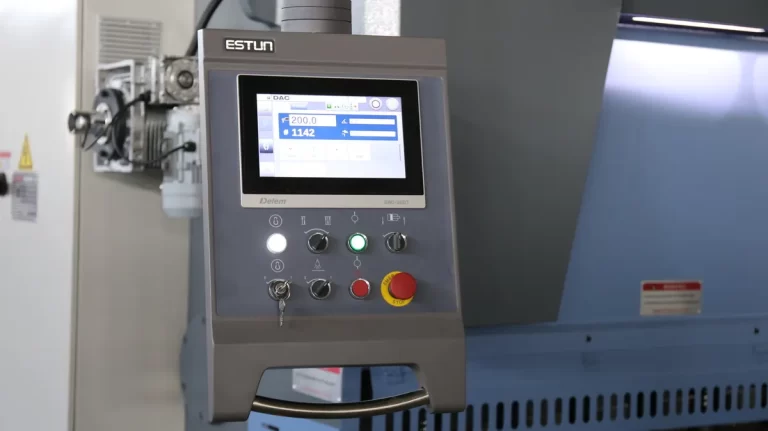
The control connects a program to machine motion. It turns part, material and tooling data into steps that the integrated drives, hydraulics and feedback execute. It shapes programming and setup, but does not determine machine accuracy on its own.
Separate what software can calculate, what the control can command and what the machine actually has. The same interface may offer different usable functions with different axes, compensation hardware and licences.
- Ram and backgauge: positioning and sequence management against the agreed axis list.
- Process calculations: use material, thickness and tool data to prepare settings.
- Angle and compensation: verify correction methods, hardware and interfaces.
- Programs and tools: storage, recall, revision control and backup.
- Graphics and diagnostics: check enabled sequence checks, prompts and alarms.
2. Delem, Cybelec and ESA: comparison priorities
A single label such as premium, simple or value does not describe a whole brand. Start with the product families, then compare identified models, software versions and delivery lists. Differences within a brand can be substantial.
| Brand | Reference families | What to examine | Verify |
|---|---|---|---|
| Delem | DA-50 / DA-60 | Numerical, 2D and 3D programming levels | Model, offline edition, machine integration |
| Cybelec | CybTouch / VisiTouch | Machine-side workflow and graphical platforms | PS model, software package, transfer and backup |
| ESA | S / VIS | Graphics and platform-specific options | Suffix, feature matrix, licences and interfaces |
3. Turn production needs into selection criteria
Choose a frequent part, a changeover-intensive part and a difficult-to-gauge or collision-prone part. Use the same demonstration workflow for every candidate to identify the functions your team will actually use.
Group requirements into essential capability, workflow improvements and future expansion. Check compatibility first, measure workflow second, and document the hardware and software needed for later additions.
- Parts and tools: profiles, bend count, handling space and interference.
- Motion and compensation: identify controlled, manual and optional items.
- Programming inputs: numerical entry, graphics, CAD import and offline preparation.
- People and support: experience, training, local service and recovery.
- Project type: assess new machines, retrofits and tandem projects separately.
4. 2D or 3D: which programming capability matters?
Numerical entry, 2D profile programming, 3D part programming and 3D machine display are different capabilities. A touchscreen is not proof of graphical programming, and a 3D machine view is not proof of full 3D part creation. Establish where programs are made, what is checked and how they reach the machine.
For stable repeat work, evaluate a clear numerical or 2D workflow first. Complex enclosures, multiple tool stations and changing jobs justify a 3D and offline demonstration. Simulation needs accurate machine, tool and part data; it does not replace physical verification or a safety assessment.
| Task | Numerical / 2D workflow | What to test in a 3D workflow |
|---|---|---|
| Simple repeat parts | Direct input and corrections | Value of additional preparation |
| Multiple bends | Profile, sequence and gauging checks | Accurate full-part modelling |
| Collision checks | Check supported objects and software | Part, tool, finger and machine models |
| CAD import | Confirm model and licence | Formats, geometry handling and licences |
| Offline preparation | Confirm model and licence | Workstation and machine compatibility |
| Frequent changeovers | Program recall and data reuse | Whether preparation reduces machine-side edits |
5. Delem: distinguish numerical, 2D and 3D levels
Delem covers several programming levels. Identify the exact model and offline edition; T, Tx and S suffixes matter. Similar appearance is not proof of equivalent functionality. Keep historical references separate from the current offer.
A key distinction is DA-66T versus DA-69T: official descriptions identify 2D programming with 3D machine setup for DA-66T, and 2D/3D programming for DA-69T. A three-dimensional view alone does not establish the same part-programming capability.
5.1 Compare DA-53T, DA-58T, DA-66T and DA-69T
This table identifies programming levels and demonstration questions, not a GWMT supply promise. In particular, the official DA-53T page describes numerical touch control; do not apply DA-53Tx graphical features to DA-53T.
| Model | Programming | 3D distinction | Offline software | Demonstrate |
|---|---|---|---|---|
| DA-53T | Numerical touch | Not full 3D part programming | Profile-53TL | Entry, correction, recall |
| DA-58T | 2D graphical | Evaluate as 2D | Profile-58TL | Profiles and bend sequence |
| DA-66T | 2D graphical | 3D setup ≠ full 3D programming | Confirm model and licence | Sequence, tool stations, checks |
| DA-69T | 2D / 3D graphical | 3D part programming | Profile-T3D | Models, simulation, transfer |
6. Cybelec: machine-side and graphical workflows
Do not combine CybTouch and VisiTouch into one feature list. Compare entry, graphics and data handling for each PS model. For more extensive graphical or 3D workflows, review the specific VisiTouch or MX platform and its software.
Offline programming, file transfer and parameter backup are distinct. Transferring a program does not establish CAD import or simulation capability. Demonstrate creation, checking, transfer, machine-side edits and a new backup.
6.1 CybTouch 8 PS, 12 PS and 15 PS
Use CybTouch 8 PS as a reference for direct numerical and EasyBend work, and 12 PS for touch-profile workflows. For 15 PS, check the exact edition, including PS versus PSe options. These are comparison starting points, subject to machine configuration.
Have operators complete a new part and recall it for a repeat job. Observe tool libraries, corrections and recovery. Screen size or a higher model number alone is not evidence of better productivity in your shop.
7. ESA: check the platform and feature matrix
ESA S-series platforms have different feature combinations. Record the suffix, software version and which functions are standard, optional or unavailable. Do not transfer 2D, 3D, import or networking claims across models.
A network or diagnostic interface is not a completed factory integration. Confirm data formats, licences, network conditions and machine integration separately. If machine-side work is the priority, demonstrate that basic workflow first.
7.1 Distinguish S630 / S640 and the S875 family
Evaluate S630 / S640 around standard bending and 2D needs, checking graphics, sequence calculation and options individually. For the S875 family, identify the suffix: this guide uses S875W in the official 2024 matrix as its 3D reference, not every product labelled S875.
Demonstrate DXF, 3D optimisation, tool management and remote functions on the offered software and machine combination. If the offer gives only a brand or family, request the exact model and licence list before comparing price.
8. Model-level comparison on one worksheet
Use this table to group candidates, not as a configuration promise. Add the offered model, axis list, software version, offline licences and formats, then test the same part. A feature on a brand website is not necessarily included in your quotation.
| Candidate | Programming reference | 3D check | Offline / import | Key check |
|---|---|---|---|---|
| DA-53T | Numerical touch | Not for 3D part programming | Confirm model and licence | Do not conflate DA-53Tx |
| DA-58T | 2D | Confirm check scope | Confirm model and licence | Profile and sequence demo |
| DA-66T | 2D | 3D machine setup | Confirm model and licence | Separate display and programming |
| DA-69T | 2D / 3D | 3D part programming | Confirm model and licence | Models and interfaces |
| CybTouch 8 / 12 / 15 PS | Model-specific | Confirm model and licence | Confirm model and licence | PS / PSe and edition |
| VisiTouch / VisiTouch MX | Platform-specific | Check MX and software scope | Confirm model and licence | Complete data workflow |
| ESA S630 / S640 | Standard / 2D evaluation | Not a full-3D choice | Confirm model and licence | Standard versus optional |
| ESA S875W | Graphical / 3D reference | Confirm model and licence | Confirm model and licence | Suffix and official matrix |
9. Choose around applications, not brand order
Evaluate features against real parts and production patterns. Repeat work emphasises recall and corrections; varied jobs emphasise preparation and data reuse; complex parts emphasise sequence, clearance and gauging. Tandem machines also need a separate synchronisation and integration review.
| Scenario | Prioritise | Demonstrate |
|---|---|---|
| Brackets, panels, repeats | Entry, recall, corrections | Steps from tool change to accepted part |
| High mix, small batches | Graphics, tool library, offline work | New drawing and program reuse |
| Enclosures and multi-bend parts | Geometry, sequence, interference | Full part with actual tools and gauging |
| Long parts, tandem machines | Synchronisation, support, integration | Complete engineered machine scope |
| Retrofit | Interfaces, feedback, axes, parameters | Feasibility and recovery plan |
9.1 Three shops, three different priorities
Shop A mainly repeats brackets: compare clear operation, program recall, gauging and angle corrections. Full 3D part programming need not be mandatory when complex geometry is rarely used.
Shop B changes jobs and makes complex enclosures: test import, sequence editing, simulation and machine handover using a complete part. Look for reduced real preparation work, not 3D as a purchase reason by itself.
Shop C plans a retrofit: qualified specialists first assess drives, feedback, hydraulics, interfaces and safety systems. Only integrable, maintainable options with a recovery plan proceed to feature and price comparison.
10. New machine, retrofit or full replacement?
A problem on an older machine is not automatically a controller fault. Parameters, drives, feedback, wiring, sensors and mechanical wear can all affect performance. Obtain a professional diagnosis before deciding on repair, retrofit or replacement.
Consider retrofit when the mechanical and hydraulic condition supports the task and the bottleneck is programming or maintainability. If capacity, condition, accuracy or safety is unsuitable, reassess the complete machine. Include downtime, commissioning, training and recovery risk in retrofit costs.
Do not independently replace controls, modify safety circuits or copy another machine’s parameters. This guide provides purchasing questions, not wiring, parameter-setting or safety-validation instructions.
11. Ownership cost beyond the initial quote
The control price is only one cost. Compare software, licences, training, commissioning, migration, downtime and maintenance on the same basis. Ask for conditions and costs of excluded items rather than assuming they are free.
Evaluate value from your own records: setup time, repeated steps, who prepares programs and how recovery works. Use those observations to compare proposals; do not assume a fixed saving percentage or payback period.
- Software: included edition, workstation entitlement and upgrade terms.
- Integration: responsibility for interfaces, verification and documents.
- Support: training content, language, spares and service scope.
- Continuity: migration, backup, restoration and transition arrangements.
12. Questions to resolve before selection
Record the answers in a technical schedule and match them to the offer, demonstration and handover documents. Supported or available does not mean included. Identify standard, optional, unresolved and inapplicable items.
- What are the exact model, suffix and software version?
- Which axes, compensation and auxiliary functions are installed and controlled?
- Which numerical, 2D, 3D-display and 3D-part capabilities are included?
- Which licences and formats are needed for CAD and offline work?
- How are parameters, tools and programs backed up, and who verifies recovery?
- What training, spares, updates and local support are offered?
- Can our drawing be demonstrated from programming to sample inspection?
13. Let the workflow decide the model
There is no universal brand answer. Define parts, axes, people and data flow, then shortlist specific Delem, Cybelec and ESA products. Use the brand overview to narrow the field; decide from a common-part demonstration and a clear delivery schedule.
For tandem, retrofit and custom projects, evaluate the controller within the complete machine design. A configuration that performs the target work, is maintainable and has a clear handover matters more than the longest feature list.
14. Frequently asked questions
These answers organise requirements; they do not replace model documentation, integration review or sample verification.
- Which controller is easier to learn?
Have operators demonstrate entry, sequence editing, corrections and recall with the same part. Interface, language, training and previous experience affect learning; the brand alone cannot answer.
- Is 3D always worth a larger budget?
Evaluate whether it addresses a real geometry, sequence or preparation bottleneck. Assess numerical or 2D workflows for simple repeat work; test complete models and licences for complex work.
- Which backgauge axes can it control?
It depends on model, licences, interfaces and installed mechanisms. List X, R and Z movements individually and distinguish supported capacity from installed axes.
- What differs between four- and six-axis systems?
Check the axis list and counting convention. One example adds Z1/Z2 to Y1/Y2/X/R, but naming varies and it does not automatically add independent depth control.
- Can an old machine take a new control directly?
Do not assume a direct swap. Qualified specialists must assess drives, feedback, hydraulics, interfaces, safety and parameters, then define integration, commissioning and recovery.
- Are offline software and CAD import always standard?
No. Confirm editions, formats, licences and machine compatibility. File transfer does not prove modelling, optimisation or complete simulation capability.
- Which brand fits our shop?
Bring representative drawings, materials, tools, axes and production patterns. Compare the same tasks using operation records, agreed scope and support conditions rather than a universal ranking.
Technical references
- Delem · DA-53T
- Delem · DA-58T
- Delem · DA-66T
- Delem · DA-69T
- Cybelec · CybTouch 8 PS
- Cybelec · CybTouch 12 PS
- Cybelec · CybTouch 15 PS
- Cybelec · VisiTouch 19 MX
- Cybelec · VisiTouch MX Offline
- ESA · VIS-600 / 800 (2024)
Manufacturer references support process explanations; images illustrate selection topics, not an approved GWMT supply specification.